Pseudotime Spatial Trajectory Inference with Xenium Data
We will go through the tutorial on how to use stLearn to perform clustering (with or without imputation) and spatial trajectories inference with Xenium data from 10X Genomics. The main dataset we are working on is the breast cancer tumor microenvironment. You can download it here: https://www.10xgenomics.com/products/xenium-in-situ/preview-dataset-human-breast
1. Loading library
[1]:
import os
import platform

# Only constrain threads on macOS where BLAS/numba deadlocks are common.
# Must run before any numpy/scanpy import.
if platform.system() == "Darwin":
    os.environ["OPENBLAS_NUM_THREADS"] = "1"
    os.environ["MKL_NUM_THREADS"] = "1"
    os.environ["NUMBA_NUM_THREADS"] = "1"
    n_cpus = 1
else:
    n_cpus = None
[2]:
import stlearn as st
import matplotlib.pyplot as plt
import pathlib as pathlib
import numpy as np
import random as random
import os as os

st.settings.set_figure_params(dpi=120)

# Make sure all the seeds are set
seed = 0
np.random.seed(seed)
random.seed(seed)
os.environ['PYTHONHASHSEED'] = str(seed)

# Ignore all warnings
import warnings

warnings.filterwarnings("ignore")
[3]:
library_id = "Xenium_FFPE_Human_Breast_Cancer_Rep1"
[4]:
st.settings.datasetdir = pathlib.Path.cwd().parent / "data"
[5]:
st.datasets.xenium_sge(library_id=library_id, include_hires_tiff=True)
2. Reading Xenium data
You can download all the data in the 10X Genomics resource webpage. For H&E image, because it was generated separately with the main xenium data, then you need to perform the registration by your self. Here we provide an example of a H&E image which is performed a manual registration by Dr. Soo Hee Lee. You can download it here: Link

[6]:
data_dir = st.settings.datasetdir / "Xenium_FFPE_Human_Breast_Cancer_Rep1"

adata = st.read_xenium(feature_cell_matrix_file=data_dir / "cell_feature_matrix.h5",
                       cell_summary_file=data_dir / "cells.csv.gz",
                       library_id=library_id,
                       image_path=data_dir / "he_image.ome.tif",
                       scale=1,
                       spot_diameter_fullres=15,
                       alignment_matrix_file=data_dir / "he_imagealignment.csv",
                       experiment_xenium_file=data_dir / "experiment.xenium",
                       )
Added tissue image to the object!
[7]:
adata
[7]:
AnnData object with n_obs × n_vars = 167780 × 313
    obs: 'imagecol', 'imagerow'
    var: 'gene_ids', 'feature_types', 'genome'
    uns: 'spatial'
    obsm: 'spatial'
3. Preprocessing
Here, we use scanpy to perform several steps of preprocessing
[8]:
# Filter genes and cells with at least 10 counts
st.pp.filter_genes(adata, min_counts=10)
st.pp.filter_cells(adata, min_counts=10)
[9]:
# Store the raw data for using PSTS
adata.raw = adata
[10]:
# Normalization data
st.pp.normalize_total(adata)
Normalization step is finished in adata.X
After normalization, we have two options. One is using log transformation or square root transformation (recommend by the 10X team)
[11]:
# Squareroot normalize transcript counts. We need to deal with sparse matrix of .X

adata.X = np.sqrt(adata.X.toarray()) + np.sqrt(adata.X.toarray() + 1)
# If the matrix is small, we don't need to convert to numpy array. I believe, Xenium data is always large
# adata.X = csr_array(np.sqrt(adata.X) + np.sqrt(adata.X + 1))

# If you want to use log transformation, please use:
# st.pp.log1p(adata)
[12]:
# Run PCA
st.em.run_pca(adata, n_comps=50, random_state=0)
PCA is done! Generated in adata.obsm['X_pca'], adata.uns['pca'] and adata.varm['PCs']
[13]:
# Compute neighborhood graph of cells using the PCA representation
st.pp.neighbors(adata, n_neighbors=25, use_rep='X_pca', random_state=0)
Created k-Nearest-Neighbor graph in adata.uns['neighbors']
3. Clustering
Here we use leiden clustering.
[14]:
st.tl.clustering.leiden(adata, random_state=0)
Applying Leiden cluster ...
Leiden cluster is done! The labels are stored in adata.obs['leiden']
We can plot the clustering result:
[15]:
plt.rcParams["figure.figsize"] = (10, 10)
st.pl.cluster_plot(adata, use_label="leiden", image_alpha=1, size=1, cell_alpha=0.5, show_image=True, show_axis=True)
[15]:
AnnData object with n_obs × n_vars = 164000 × 313
    obs: 'imagecol', 'imagerow', 'n_counts', 'leiden'
    var: 'gene_ids', 'feature_types', 'genome', 'n_counts'
    uns: 'spatial', 'pca', 'neighbors', 'leiden', 'leiden_colors'
    obsm: 'spatial', 'X_pca'
    varm: 'PCs'
    obsp: 'distances', 'connectivities'
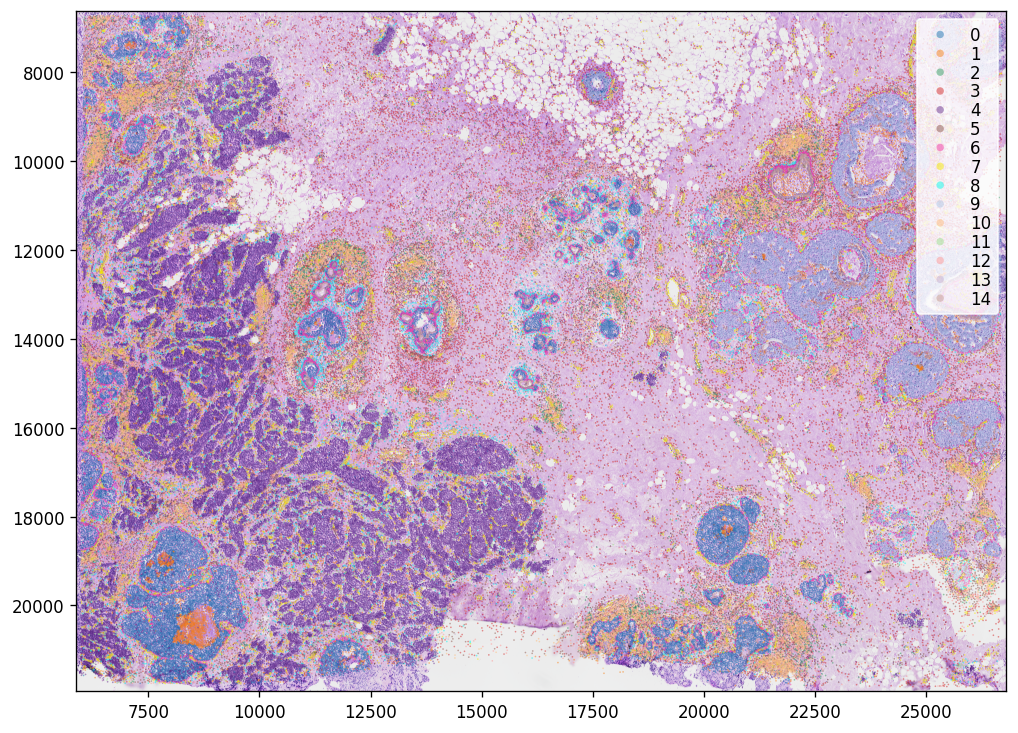
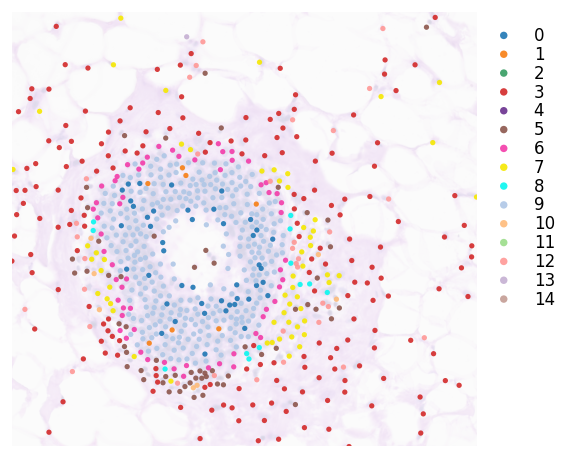
You can crop a region of interest with zoom_coord parameter. This picks a DCIS region at the top middle of the sample.
[16]:
# Zoom coordinates
roi_coord = (17000.0, 18500.0, 7500.0, 8900.0)
[17]:
plt.rcParams["figure.figsize"] = (5, 5)
st.pl.cluster_plot(adata, use_label="leiden",
                   image_alpha=0.2, size=10,
                   cell_alpha=0.9,
                   zoom_coord=roi_coord,
                   bbox_to_anchor=(1.2, 1),
                   show_color_bar=True)
[17]:
AnnData object with n_obs × n_vars = 164000 × 313
    obs: 'imagecol', 'imagerow', 'n_counts', 'leiden'
    var: 'gene_ids', 'feature_types', 'genome', 'n_counts'
    uns: 'spatial', 'pca', 'neighbors', 'leiden', 'leiden_colors'
    obsm: 'spatial', 'X_pca'
    varm: 'PCs'
    obsp: 'distances', 'connectivities'
4. PSeudo-Time-Space (PSTS) for spatial trajectory analysis
We provide PSTS for spatial trajectory analysis.
The first step is to select the root index. We allow the user to automatically select the index of the cell but still need to input which cluster should be the root cluster in your biological question.
In this tutorial, we focus on the cancer progression from Ductal carcinoma in situ (DCIS) to Invasive ductal carcinoma (IDC). That is why we choose the root cluster 9 as the DCIS cluster.
[18]:
# Subset spatial data by ROI coordinates.
roi_mask = (
    (adata.obs["imagecol"] >= roi_coord[0]) & (adata.obs["imagecol"] <= roi_coord[1]) &
    (adata.obs["imagerow"] >= roi_coord[2]) & (adata.obs["imagerow"] <= roi_coord[3])
)
adata_roi = adata[roi_mask].copy()
[19]:
adata_roi.uns["iroot"] = st.spatial.trajectory.set_root(
    adata_roi,
    use_label="leiden",
    cluster="9",
    use_raw=True
)
adata_roi.uns["iroot"]
[19]:
np.int64(700)
For the pseudotime function, we use diffusion pseudotime (DPT) to initialize pseudotime scores at the gene expression level. pseudotimespace_global is the function for incorporating the spatial information to construct the (meta) trajectory in the spatial context.
Key parameters:
epscontrols spatial subcluster size,thresholdfilters weak PAGA connections (larger values filters out connections),radiuscontrols the spatial smoothing radius for the diffusion map, anduse_labelspecifies the clustering.
[20]:
st.spatial.trajectory.pseudotime(adata_roi, eps=50, use_rep="X_pca", use_label="leiden")
WARNING: Transition matrix has many disconnected components!
All available trajectory paths are stored in adata.uns['available_paths'] with length < 4 nodes
In this dataset, the IDC cluster we are looking for is the one on the edge of ducts. This part is the first layer of invasive cancer cells starting from DCIS. That’s how we choose cluster 9 for the IDC.
[21]:
st.spatial.trajectory.pseudotimespace_global(adata_roi, use_label="leiden", list_clusters=["9", "6"])
Start to construct the trajectory: 7 -> 4
[21]:
AnnData object with n_obs × n_vars = 759 × 313
    obs: 'imagecol', 'imagerow', 'n_counts', 'leiden', 'sub_cluster_labels', 'dpt_pseudotime'
    var: 'gene_ids', 'feature_types', 'genome', 'n_counts'
    uns: 'spatial', 'pca', 'neighbors', 'leiden', 'leiden_colors', 'iroot', 'leiden_index_dict', 'paga', 'leiden_sizes', 'diffmap_evals', 'threshold_spots', 'split_node', 'global_graph', 'centroid_dict', 'available_paths', 'PTS_graph'
    obsm: 'spatial', 'X_pca', 'X_diffmap'
    varm: 'PCs'
    obsp: 'distances', 'connectivities'
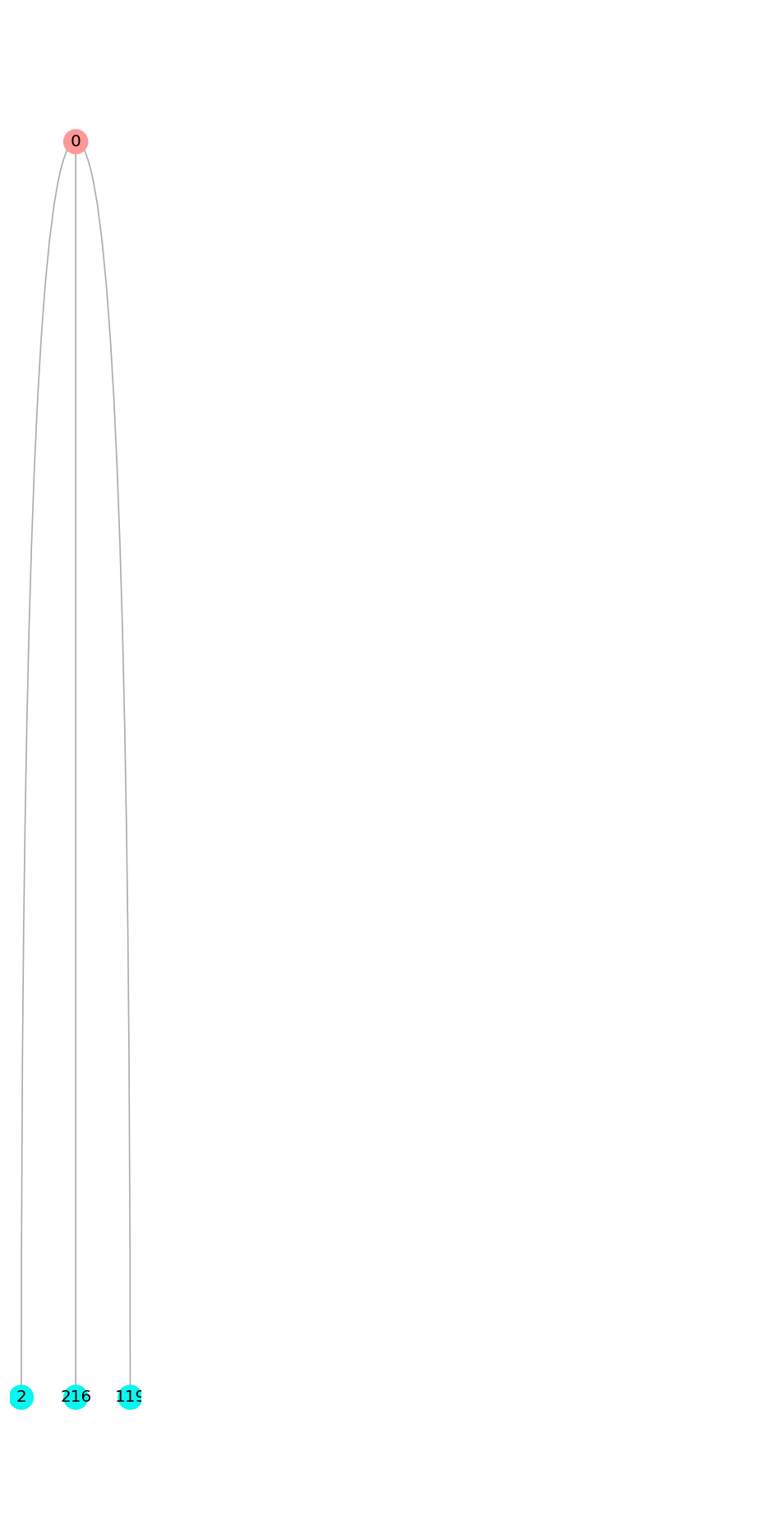
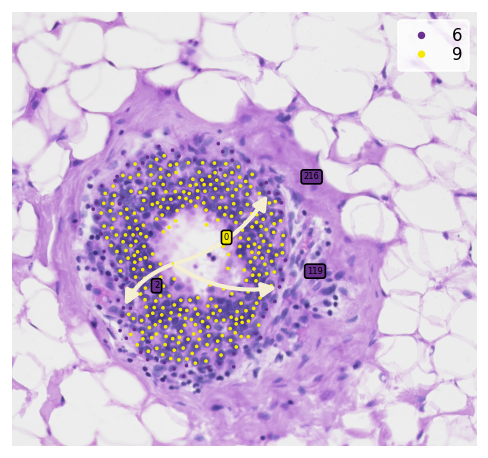
After construct the spatial trajectories from DCIS to IDC cluster. We can observe multiple meta-trajectories with sub-clusters which generated by spatial feature. With tree_plot, you can show all of the detail sub-clusters ids.
[22]:
st.pl.trajectory.tree_plot(adata_roi, figsize=(10, 20), ncols=5)
[22]:
AnnData object with n_obs × n_vars = 759 × 313
    obs: 'imagecol', 'imagerow', 'n_counts', 'leiden', 'sub_cluster_labels', 'dpt_pseudotime'
    var: 'gene_ids', 'feature_types', 'genome', 'n_counts'
    uns: 'spatial', 'pca', 'neighbors', 'leiden', 'leiden_colors', 'iroot', 'leiden_index_dict', 'paga', 'leiden_sizes', 'diffmap_evals', 'threshold_spots', 'split_node', 'global_graph', 'centroid_dict', 'available_paths', 'PTS_graph'
    obsm: 'spatial', 'X_pca', 'X_diffmap'
    varm: 'PCs'
    obsp: 'distances', 'connectivities'
Now, we can crop and discover the transition genes of sub-clusters meta-trajectory
[23]:
st.pl.cluster_plot(
    adata_roi,
    use_label="leiden",
    show_trajectories=True,
    list_clusters=["9", "6"],
    show_subcluster=True,
    zoom_coord=roi_coord,
    show_node=False
)
[23]:
AnnData object with n_obs × n_vars = 759 × 313
    obs: 'imagecol', 'imagerow', 'n_counts', 'leiden', 'sub_cluster_labels', 'dpt_pseudotime'
    var: 'gene_ids', 'feature_types', 'genome', 'n_counts'
    uns: 'spatial', 'pca', 'neighbors', 'leiden', 'leiden_colors', 'iroot', 'leiden_index_dict', 'paga', 'leiden_sizes', 'diffmap_evals', 'threshold_spots', 'split_node', 'global_graph', 'centroid_dict', 'available_paths', 'PTS_graph'
    obsm: 'spatial', 'X_pca', 'X_diffmap'
    varm: 'PCs'
    obsp: 'distances', 'connectivities'
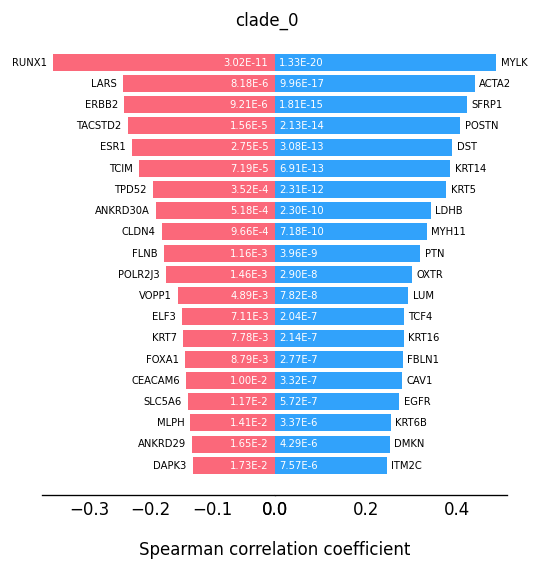
Finding the transition markers of clade_0
[24]:
st.spatial.trajectory.detect_transition_markers_clades(adata_roi, clade=0, use_raw_count=False, cutoff_spearman=0.1)
Detecting the transition markers of clade_0...
Transition markers result is stored in adata.uns['clade_0']
Plot the transition markers, red color is down-regulated gene, blue color is up-regulated gene
[25]:
plt.rcParams["figure.figsize"] = (5, 5)
st.pl.trajectory.transition_markers_plot(adata_roi, top_genes=20, trajectory="clade_0")
[25]:
AnnData object with n_obs × n_vars = 759 × 313
    obs: 'imagecol', 'imagerow', 'n_counts', 'leiden', 'sub_cluster_labels', 'dpt_pseudotime'
    var: 'gene_ids', 'feature_types', 'genome', 'n_counts'
    uns: 'spatial', 'pca', 'neighbors', 'leiden', 'leiden_colors', 'iroot', 'leiden_index_dict', 'paga', 'leiden_sizes', 'diffmap_evals', 'threshold_spots', 'split_node', 'global_graph', 'centroid_dict', 'available_paths', 'PTS_graph', 'clade_0'
    obsm: 'spatial', 'X_pca', 'X_diffmap'
    varm: 'PCs'
    obsp: 'distances', 'connectivities'
We can observe some keratinocytes family genes here as the progression markers.
Acknowledgement
We would like to thank Soo Hee Lee and 10X Genomics team for their able support, contribution and feedback to this tutorial